Our Reaction Time Suite: A Cleaner Way to Run Cognitive Tasks Without the Usual Software Nonsense
If you have ever tried to run a reaction time task for a class project, you will know how this usually goes. The software is either painfully outdated, bizarrely expensive, or designed in a way that suggests students were never meant to touch it. So you improvise. You click around. You build half a method out of browser tabs, spreadsheets, and increasingly strained optimism, then hope it all looks respectable by the time it reaches the write-up.
Our Reaction Time Suite is our attempt to make that process less irritating.
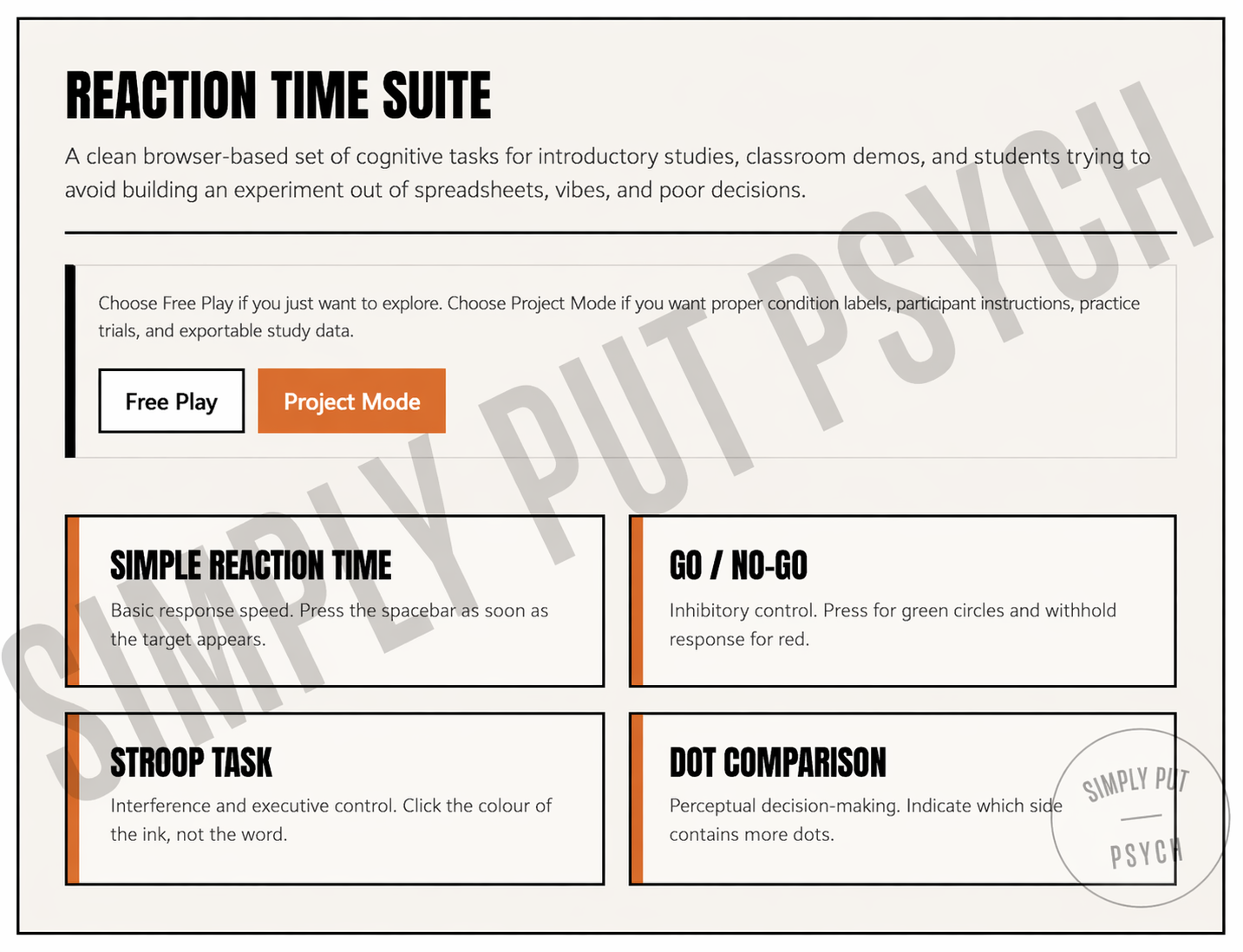
It gives you four classic cognitive tasks in one browser-based tool: Simple Reaction Time, Go / No-Go, Stroop, and Dot Comparison. You can use Free Play if you want to explore, test yourself, or see how the tasks work. If you need something more structured, Project Mode gives you participant instructions, a short practice round, condition labels, and exportable data.
Which is, frankly, the sort of thing these tools should have been doing all along.
Try the Demo at the Bottom of the Page
Why this tool exists
A lot of student projects do not become difficult because the idea is especially complicated. They become difficult because the tools are awkward, the setup is messy, the instructions are unclear, and the outputs are annoying to work with afterwards. Before long, a perfectly ordinary study idea has turned into an argument with software that seems to believe inconvenience is part of the scientific method.
That is the gap this tool is trying to fill.
Our Reaction Time Suite is built for the sort of work students actually do. First-year studies. Classroom demos. Exploratory comparisons. Small project designs where you want a proper task, sensible instructions, and data you can export without having to reconstruct the whole thing by hand later.
It is not trying to impersonate a high-end lab platform. It is trying to be useful.
What you can do with it
The suite includes four well-known task types, which means it is broad enough to be useful without becoming a cluttered mess.
Simple Reaction Time gives you a straightforward speed measure. If you want the cleanest possible task for looking at basic response speed, this is the obvious place to start.
Go / No-Go adds inhibitory control. Instead of simply responding, participants have to respond selectively, which makes it useful for projects involving attention and impulse control.
Stroop gives you a classic interference task. Participants respond to the ink colour rather than the word itself, which is where things become mildly annoying in the productive sense.
Dot Comparison is a perceptual decision task. Participants decide which side contains more dots, and the response mapping can be reversed so handedness and side bias do not quietly turn into your problem later.
That spread matters because reaction time is not one simple thing. Sometimes it is raw speed, or it is speed plus accuracy, or it is interference, or it is inhibition. A tool like this helps make that distinction clearer, which is useful not just for running studies but for understanding them.
Four Tests, One Suite
Classic Cognitive Tasks
Free Play & Project Modes
Export Results as CSV
FREE for personal use
The pain points it solves
The main strength of the suite is that it removes a lot of the unnecessary friction that usually surrounds this kind of work.
You do not need to cobble together a task from whatever questionable free tool you found five minutes before panic set in.
You do not need to explain the task badly to a participant and then wonder whether trial one was ruined before it even started.
You do not need to collect a few numbers, realise they are not especially well organised, and then spend the rest of the afternoon trying to remember what each column was supposed to mean.
Instead, you get a cleaner workflow. Pick a task. Run it in Free Play if you just want to test ideas. Use Project Mode if you need proper setup, participant instructions, practice trials, and export-ready data. Then move on with your life.
There is something oddly luxurious about that when you are used to student software.
Better for undergraduates, which is the point
A quick note on precision is still worth making.
This is a browser-based tool designed for teaching, demos, exploratory work, and introductory student research. It is useful, clean, and a lot less irritating than doing everything by hand, but it is not pretending to replace specialist experimental software in high-precision lab settings.
Perfect for undergrads. For PhDs, that is what your budget is for.
That is not a weakness. It is just honesty. For the kind of projects most students are actually running, the right tool is not the most complicated one. It is the one that is clear enough to use properly and solid enough to give you data you can actually work with.
A digital reaction time playground, but useful
One of the nicer things about the suite is that it leaves room for exploration. You can try things out, make mistakes, rerun tasks, compare conditions, and get a feel for how different cognitive measures behave before you commit yourself to writing a whole project around them.
That is why the idea of a digital reaction time playground works so well here. Not because it is a toy, but because good methods teaching should leave some room for curiosity. Students should be able to explore without every click feeling like a formal administrative process.
Free Play gives you that freedom. Project Mode gives you the more structured version when it is time to stop poking at ideas and actually collect data.
Both have their place.
Who it is for
Our Reaction Time Suite is especially useful if you are:
planning a first-year or early undergraduate study
running a classroom demonstration
testing ideas around caffeine, time of day, music, fatigue, or simple condition comparisons
looking for a cleaner way to collect reaction time data without descending into unnecessary chaos
It is also useful if you are simply tired of software that looks like it was built by someone with a personal grudge against clear design.
How to access Reaction Time Suite
Our Reaction Time Suite is FREE for personal use. For institutional access, please contact us
Table of Contents




Demo Instructions
This is a short preview of the task rather than the full study version.
This demo runs for 5 trials only. The full version includes longer runs, fuller setup options, and exportable data.
Demo Complete
You have finished the 5-trial preview.